DesignFlow: In-Browser Design Tools Docked in Chrome
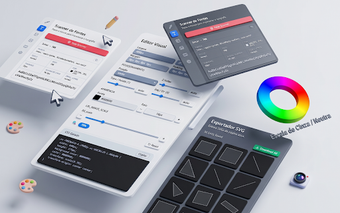
DesignFlow, developed by Régis Cardoso (DSR), is a Chrome extension that consolidates browser-based design tasks into a side-docked workspace for UI/UX designers and frontend developers. It centralizes inspection, live editing, accessibility auditing, and asset extraction so fewer external tools are needed during interface reviews. The extension uses the Chrome Side Panel to remain available while you navigate, emphasizes local processing to protect project data, and suits professionals who prefer a single-pane browser workflow without switching applications.
DesignFlow targets in-browser workflows with a side-docked interface
The app runs inside Chrome's Side Panel API so tools stay visible while the main page remains unobstructed. It is built on Manifest V3 and requires a Chrome build that supports that panel API. The extension packages the same panel UI for Windows, macOS, Linux, and ChromeOS, which preserves a consistent inspection environment across desktop platforms and avoids opening separate application windows during interface reviews.
DesignFlow processes design data locally to limit external exposure
The developer implemented a privacy-first architecture that processes color sampling, DOM inspection, and asset packaging inside the browser, and the tool does not send navigation history or design data to external servers. That local-first approach uses native browser APIs to perform sampling and export tasks on the user's machine, which keeps exported ZIP archives and extracted assets under the user's control rather than transmitted to third-party services.
In-browser editing, testing, and extraction use concrete browser APIs and batch tools
The extension exposes a visual CSS editor that modifies margins, padding, z-index, and dimensions on the live DOM, plus a hover-to-inspect font scanner for families and sizes. Color Studio integrates the EyeDropper API and supports drag-and-drop of local image files to extract palettes. The Asset Exporter performs a batch scan of a page and packages SVGs and raster images into a ZIP, while the Responsive Breakpoint Tester shows side-by-side previews with synchronized scrolling for layout checks.
DesignFlow suits designers who prefer a single-browser, privacy-focused workflow
The app is a practical choice for UI/UX designers and frontend developers who favor working inside Chrome and keeping data local, given its Side Panel integration and local processing model. A clear trade-off is the dependency on a Chrome build that supports the Side Panel API, which can limit use in environments running older or locked browser versions.